

Gray Land News | October 10, 2026
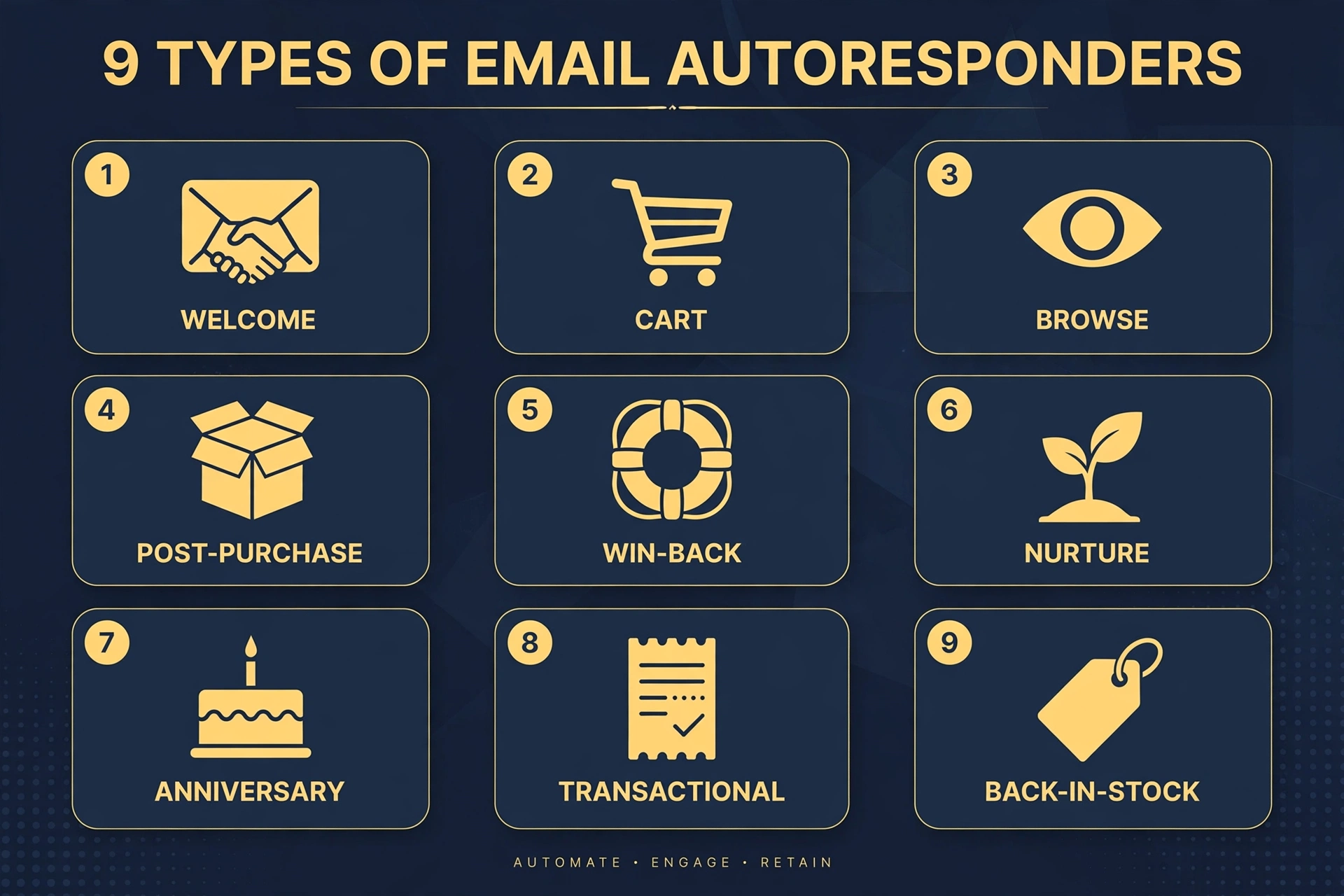
Email autoresponders are automated messages triggered by a subscriber’s action, status, or date—not by a marketer choosing a broadcast time. The nine essential types are welcome, abandoned cart, browse abandonment, post-purchase, win-back, lead nurture, milestone, transactional, and back-in-stock or price-drop emails. They deserve priority because they respond when interest already exists. Omnisend’s company-published analysis of 2025 ecommerce activity found automated emails generated $3.41 per send, compared with $0.155 for campaigns. That is attributed revenue, not profit or a guaranteed return, but it makes a strong case for building useful automations before producing another promotional blast.
For a small business, the attraction is practical: write the right follow-up once, connect it to the right event, and maintain it rather than rebuilding it every week.
The operative word is relevance. Automation does not rescue an irrelevant offer. It makes a relevant response timely and repeatable.
The Argument
Most businesses treat email as a newsletter chore. The data says otherwise: automated, triggered emails earn dramatically more engagement than scheduled broadcasts, and two flows — welcome and abandoned cart — drive the vast majority of automation revenue. The businesses winning at email in 2026 aren’t sending more email; they’re sending the right email at the right moment, on authenticated domains, with consent handled properly. Start with welcome and cart. Everything else is optimization.
What Is an Email Autoresponder?
An email autoresponder is an automated email—or sequence of emails—sent when someone meets predefined conditions. Those conditions might include joining a list, purchasing a product, requesting information, or becoming inactive.
A broadcast follows the marketer’s calendar. An autoresponder follows the customer’s circumstances. Omnisend’s benchmark analysis distinguishes these behavior-triggered messages from scheduled campaigns.
A basic autoresponder sends one message. A more developed workflow adds delays, conditions, and exit rules. Someone who purchases after a cart reminder should leave the cart sequence. A prospect who books a consultation should stop receiving messages asking them to book.
That distinction separates useful automation from automated aggravation.
The Nine Types of Email Autoresponders
1. Welcome and Onboarding Series
- Trigger: A subscriber joins a list, creates an account, or registers for a service.
- Goal: Establish expectations and encourage the first meaningful action.
- When to use it: Immediately after signup, followed by a short sequence appropriate to the relationship.
Deliver what the subscriber requested first. Then explain what future emails will contain, introduce the business, and provide one clear next step.
For a retailer, that might be a first purchase. For a Jackson-area professional service, it might be submitting project details or scheduling a consultation.
Welcome messages are commercially important, but avoid universal performance promises. Omnisend’s current company-published benchmark reports a 35.53% welcome open rate and $6.16 in attributed revenue per email—different from some commonly circulated benchmark ranges.
2. Abandoned-Cart Emails
- Trigger: An identifiable shopper adds products to a cart but does not complete checkout.
- Goal: Recover an interrupted purchase.
- When to use it: Test an initial reminder approximately one to two hours after abandonment, subject to permission requirements.
The first message should make returning easy: show the products, link to the cart, and offer help. Do not assume every abandoned purchase needs a discount.
Later messages can address genuine obstacles, such as shipping questions or product suitability. Stop the sequence when the customer purchases.
Omnisend reports $3.59 in attributed revenue per abandoned-cart email in its 2025 dataset. Treat that as a vendor benchmark, not a store-level forecast.
3. Browse-Abandonment Emails
- Trigger: A known, eligible contact views a product or category without adding an item to a cart.
- Goal: Help an interested shopper continue evaluating.
- When to use it: When permitted tracking and reliable identification connect browsing activity to a contact.
Browsing shows interest, not necessarily purchase intent. Use a lighter approach than cart recovery: buying guidance, relevant alternatives, or answers to common questions.
Avoid announcing that you watched every page the person visited. Helpful relevance should not feel like surveillance.
Omnisend’s current “page viewed” benchmark reports $0.76 in attributed revenue per email, illustrating why browse flows should complement—not replace—higher-intent automations.
4. Post-Purchase and Thank-You Emails
- Trigger: A completed purchase or fulfilled service.
- Goal: Improve the customer experience and encourage an appropriate next interaction.
- When to use it: After purchase, with later messages timed to delivery, usage, or service completion.
Separate essential receipts and shipping updates from promotional follow-ups. A useful sequence can explain product care, provide setup guidance, request feedback after sufficient use, and eventually introduce complementary products. A service business can explain what happens next and when a customer should expect contact.
Timing matters. Asking for a review before delivery demonstrates that the workflow is following a clock rather than serving the customer.
Omnisend reports distinct results for order follow-up, feedback, and cross-sell messages; they should not be treated as one interchangeable category.
5. Win-Back and Re-Engagement Emails
- Trigger: A defined period without meaningful engagement or purchasing.
- Goal: Recover interest or identify contacts who should stop receiving promotions.
- When to use it: Start testing around 60–90 days of inactivity, then adjust for the normal buying cycle.
A monthly replenishment product and an annual service need different inactivity rules. Offer a useful reason to return: a relevant update, changed product availability, or an opportunity to revise preferences. End the sequence with suppression if interest does not return.
Do not define inactivity solely by unopened emails. Open tracking can be misleading; consider clicks, purchases, replies, and account activity. Omnisend reports customer reactivation as its lowest-revenue automation category, while emphasizing its list-health value.
6. Lead-Nurture and Drip Sequences
- Trigger: A content download, inquiry, trial registration, or other qualifying action.
- Goal: Help a prospect make an informed decision.
- When to use it: When buying requires explanation, evaluation, or multiple conversations.
Deliver the requested resource first. Then answer the questions that stand between interest and action: suitability, implementation, limitations, and next steps.
For example, a hypothetical commercial contractor could follow a maintenance-guide download with inspection guidance, an explanation of the estimating process, and an invitation to discuss the property.
Use branching and exit rules where supported. A booked appointment should change the conversation, not merely add another message to it.
7. Anniversary, Birthday, and Milestone Emails
- Trigger: A voluntarily supplied date or a verified customer milestone.
- Goal: Recognize the relationship and reinforce loyalty.
- When to use it: When the occasion provides a credible reason to contact someone. Examples include membership anniversaries, completed training, or a customer’s first year with the business.
Keep recognition proportionate. A useful benefit or sincere acknowledgment often fits better than another generic sale.
Collect only the date information needed. A birthday offer does not automatically justify collecting a full birth date.
8. Confirmation and Transactional Emails
- Trigger: An order, payment, appointment, password reset, or account event.
- Goal: Confirm an action and deliver essential information.
- When to use it: Promptly after the event.
These messages should be clear, dependable, and focused on the transaction. Under CAN-SPAM, messages whose primary purpose is genuinely transactional or relationship-based are exempt from most commercial-email provisions, but truthful routing information remains required. Mixed messages require a primary-purpose assessment; adding promotional content does not create a consent workaround.
The safest operational rule is to keep marketing out of receipts, security notices, and essential confirmations. Google also recommends separating promotional and transactional content.
9. Back-in-Stock and Price-Drop Emails
- Trigger: A requested product returns to stock or meets a relevant price-change condition.
- Goal: Convert demonstrated product interest.
- When to use it: When inventory and pricing data are accurate and the recipient is eligible for the notification.
Lead with the change the customer wanted to hear about. Link directly to the product, and stop alerts after purchase or withdrawal.
Never manufacture scarcity. Omnisend’s company-published dataset reports $9.14 in attributed revenue per back-in-stock email, the highest revenue-per-email result among the automation types listed in its current benchmark. That does not establish an equivalent result for price-drop messages.

Choosing Software: Buy the Workflow, Not the Logo
Before comparing platforms, write down the automations the business needs. Then confirm that the specific plan—not merely the platform’s advertising—supports them.
Evaluate six areas:
- Authentication: Guided SPF, DKIM, and DMARC setup, plus RFC 8058 one-click unsubscribe support.
- Workflow depth: Delays, branching, exit conditions, and any necessary scoring or conditional content.
- Segmentation: Purchase history, engagement, tags, lifecycle stage, and customer-supplied preferences.
- Integrations: Your ecommerce system, CRM, website, and any separately authorized messaging channels.
- Billing: Contact definitions, duplicate handling, send limits, add-ons, and overages.
- Reporting: Results by workflow, including conversions or attributed revenue where applicable.
Beginner-Friendly and Small-Business Options
Mailchimp is a reasonable starting shortlist for general email marketing, but its free plan is not the automation solution described here. Its official page lists 250 free contacts, Essentials starting at $13 monthly, and Standard starting at $20 monthly; Standard explicitly emphasizes automations. Confirm the required workflow features before selecting a tier.
MailerLite offers a straightforward alternative. Its current official pricing page differs from older free-plan descriptions: it lists 250 subscribers, 2,500 monthly emails, and three automations. Comfort starts at $12 monthly.
Ecommerce Options
Omnisend and Klaviyo belong on an ecommerce shortlist. Omnisend’s official free plan includes automation, up to 250 contacts, and 500 monthly emails. Its page displays a Standard-plan promotion of $11.20 monthly equivalent when paying the first three months upfront, against a $16 monthly base for the displayed 500-contact tier. Distinguish introductory discounts from ongoing costs.
Klaviyo is worth evaluating when customer and product data drive the strategy. Obtain a current quote for the actual profile count and required channels rather than relying on a variable entry-price estimate.
Creators, CRM Teams, and Multichannel Businesses
Kit fits creator-led businesses. Its official page lists a free tier up to 10,000 subscribers and Creator at a displayed $33 monthly equivalent, with $390 billed yearly for 1,000 subscribers. Unlimited visual automations are listed on Creator.
Brevo fits businesses evaluating email alongside other channels. Its official page confirms a free allowance of 300 emails daily, places unlimited multistep marketing automation on Standard, and lists WhatsApp among Professional features. Do not assume every channel is included at entry level.
ActiveCampaign deserves consideration for complex branching; HubSpot for CRM-centered operations; Constant Contact for nonprofit or event-focused programs; and GetResponse for webinar-and-funnel requirements. These are best-fit starting points, not rankings. Require a demonstration of your actual workflow.
Setup Steps: Build a Controlled System
- Authenticate before sending. Configure SPF, DKIM, and DMARC, preferably using a dedicated sending subdomain such as mail.yourdomain.com. Verify the configuration rather than assuming saved DNS records are correct.
- Build the list cleanly. Use confirmed opt-in, explain what subscribers will receive, and preserve permission records. Avoid purchased lists; Google specifically advises against purchasing email addresses.
- Connect the data. Link ecommerce, CRM, and permitted website events. Test whether signups, purchases, and opt-outs reach the email platform correctly.
- Launch the first essential flows. Start with welcome and cart recovery for ecommerce. For service businesses without carts, prioritize welcome and lead nurture.
- Add the next layer. Introduce post-purchase, browse, and win-back workflows after the initial system works reliably.
- Set suppression and frequency rules. Remove purchasers from recovery flows, coordinate promotions across workflows, and suppress persistently inactive contacts.
- Test the complete journey. Check mobile rendering, links, personalization fallbacks, purchase exits, major-mailbox delivery, and unsubscribe behavior—not just the appearance of one email.
Customization: Personalize the Help
First-name insertion is a convenience, not a strategy. More useful personalization reflects purchase history, expressed preferences, lifecycle stage, or relevant location. Zero-party data means information customers intentionally provide, such as product interests or communication preferences.
Dynamic content can show different guidance or products to different segments. Omnisend’s official feature list includes conditional content and personalized product recommendations; availability should still be checked against the selected plan.
Apply four controls:
- Give missing data a sensible fallback.
- Test whether recommendations remain accurate.
- Coordinate timing across all active sequences.
- Use data only for permitted, disclosed purposes.
The standard is simple: would the customer understand why this message arrived—and find it useful?
Deliverability: The 2026 Baseline
Google and Yahoo began enforcing stronger sender requirements in February 2024. Microsoft added high-volume requirements for Outlook.com domains in May 2025. Their policies overlap, but they are not identical.
For a practical baseline:
- Configure SPF, DKIM, and DMARC, with From-domain alignment.
- Support valid forward and reverse DNS and TLS transmission.
- Include a visible unsubscribe link.
- Support RFC 8058 one-click unsubscribe for applicable marketing mail.
- Process unsubscribe requests within two days.
- Target Gmail spam complaints below 0.1% and avoid reaching 0.3%.
Precision matters: Gmail requires SPF or DKIM for all senders, and SPF, DKIM, and DMARC for bulk senders exceeding its daily threshold. Implementing all three early is prudent, but it is not accurate to describe both SPF and DKIM as Gmail’s minimum for every small sender.
Monitor Google Postmaster Tools and delivery errors. Authentication helps establish legitimacy; it does not guarantee inbox placement.
Compliance Basics: Permission Travels With the Contact
United States: CAN-SPAM
CAN-SPAM generally follows an opt-out model. Commercial messages need accurate headers, nondeceptive subjects, appropriate advertising identification, a valid postal address, and a working opt-out mechanism. Honor requests within 10 business days; the faster mailbox-provider standard remains the better operational target. Business-to-business email is not exempt.
The FTC guide currently lists penalties up to $53,088 per violating email. That is a published ceiling, not an automatic assessment, and statutory penalties can change.
European Union and EEA: GDPR and Email-Marketing Rules
GDPR governs personal-data processing; ePrivacy rules also govern marketing email. Treating “GDPR means opt-in” as the whole rule overlooks national implementation and applicable exceptions. A permission-based program should document consent’s timing, method, and purpose and make withdrawal easy.
Serious GDPR infringements can attract maximum fines of €20 million or 4% of worldwide annual turnover, whichever is higher.
Canada: CASL
CASL generally requires express consent or a valid basis for implied consent. The sender must prove that permission exists. Importantly, an abandoned cart is not a purchase establishing the two-year purchase-based implied-consent period.
Do not apply a blanket three-year consent-record deletion rule. The CRTC says no prescribed retention period exists; retain proof for as long as you rely on it to contact the person. Organizational penalties can reach CAD $10 million per violation.
These are operating basics, not jurisdiction-specific legal advice.
Frequently Asked Questions
Which autoresponders should a small business build first?
Build welcome first. Add abandoned-cart recovery for ecommerce or lead nurture for a service business. Omnisend’s results support prioritizing welcome and cart flows, but local performance still depends on audience and execution.
Can free email software run autoresponders?
Some plans can. Omnisend and MailerLite currently include automations on their free tiers, with strict contact, send, or workflow limits. “Free email marketing” does not necessarily mean free multistep automation.
What should I measure besides opens?
Measure clicks, purchases, qualified inquiries, unsubscribes, complaints, and results by workflow. Open tracking can be inflated by privacy-related preloading, so opens alone are not a dependable business scorecard.
Ten Rules Worth Keeping Beside the Dashboard
- Build welcome and your highest-intent follow-up first.
- Authenticate before the first send.
- Use confirmed opt-in.
- Match timing to the customer’s situation.
- Segment by behavior and lifecycle.
- Personalize with permitted, relevant data.
- Cap promotional frequency and retire inactive contacts.
- Make unsubscribing easy and fast.
- Preserve consent and suppression records.
- Test before launch and monitor delivery afterward.
The next phase of email automation will offer more AI-assisted recommendations and workflow controls; current platforms already advertise those capabilities.
The business advantage, however, remains plain: recognize the customer’s need, respond usefully, and stop when the response is no longer welcome.
Want Jackson’s top local stories in one place? Browse the businesses shaping the area in the NeighborClick Local directory — JOIN the FREE Private Insider List for local stories, business spotlights, community updates and even if you don’t have business you’ll be an Insider.


Comments